PICO
Use PICO full-body tracking through XRoboToolkit to retarget a 24-joint body to Unitree G1. Record sessions for offline replay, or use controller buttons to open and close two Inspire hands alongside body motion.
PicoSource converts the SDK's Y-up poses to a canonical Z-up BodyFrame. The combined body-and-hands runtime uses B and Y buttons for the hands.
Connect XRoboToolkit
Install XRoboToolkit PC Service, then install the pinned Python SDK from the RetargetingKit repository:
uv sync --extra pico
Start one foreground service and leave its terminal open. For the standard /opt/apps/roboticsservice installation:
cd /opt/apps/roboticsservice
env \
  LD_LIBRARY_PATH=/opt/apps/roboticsservice:/opt/apps/roboticsservice/lib:/opt/apps/roboticsservice/SDK/x64 \
  QT_PLUGIN_PATH=/opt/apps/roboticsservice/plugins \
  QT_QML_PATH=/opt/apps/roboticsservice/qml \
  ./RoboticsServiceProcess
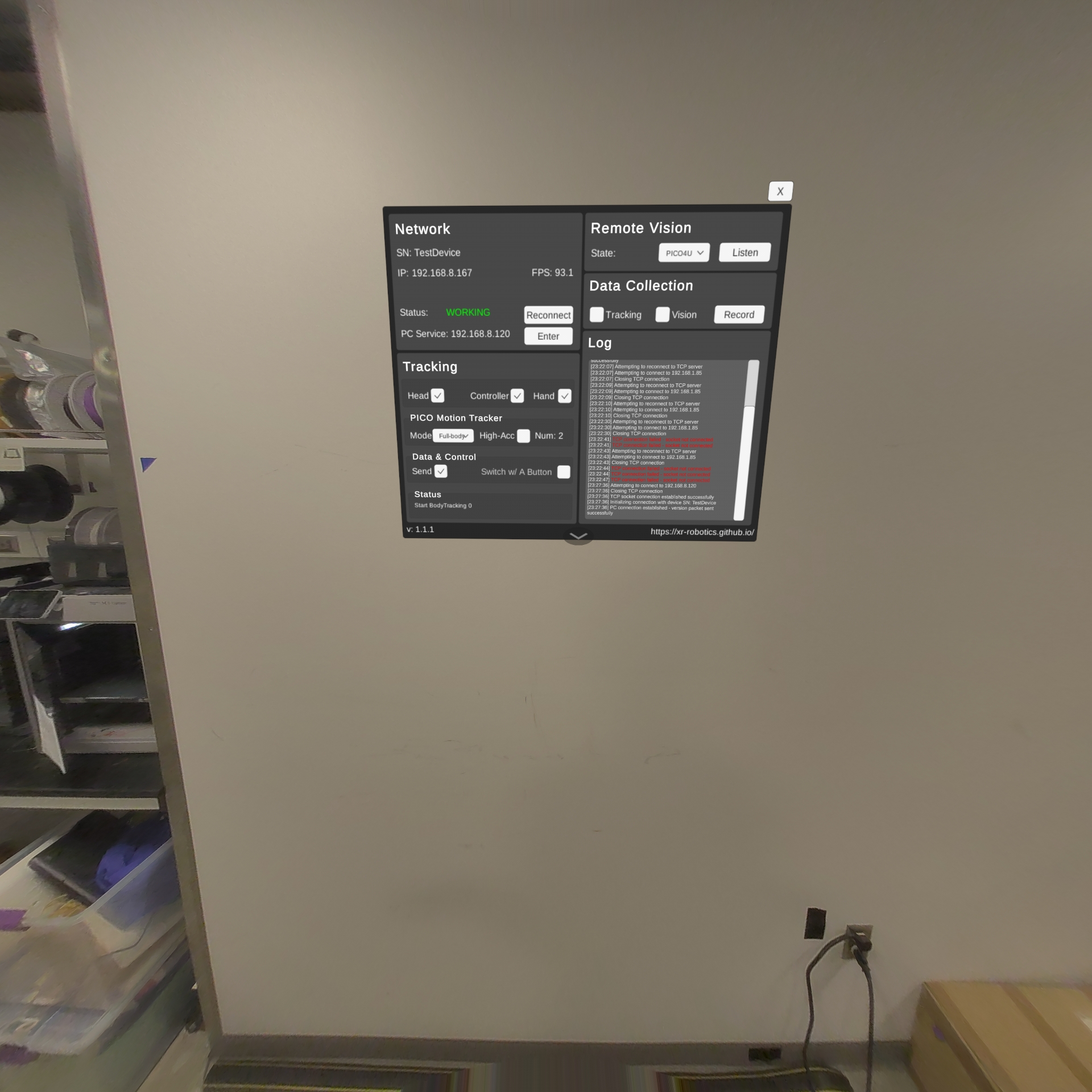
Connect the workstation and PICO to the same Wi-Fi. In the headset's XRoboToolkit app, enter the workstation's Wi-Fi IPv4 address under PC Service, select Reconnect once, and apply these settings:
| Setting | Value |
|---|---|
| Head, Controller, Hand | Checked |
| Mode | Fullbody |
| High-Acc | Unchecked |
| Num | 2 |
| Send | Checked |
| Switch w/ A Button | Unchecked |
| Data Collection: Tracking, Vision | Unchecked |
Network Status should show WORKING. Any IP shown in a reference image is an example; enter your workstation's address.
Check body tracking
In a second terminal, return to the RetargetingKit repository and run:
uv run --extra pico scripts/sources/pico/smoke_test.py --duration 5
Move your body during the test. It prints pelvis motion and a final 24-joint snapshot. If all poses remain frozen, fully close XRoboToolkit, recalibrate both trackers in the PICO Motion Tracker app, check that its avatar moves, and reopen XRoboToolkit.
Preview G1
CUDA_VISIBLE_DEVICES=<FREE_GPU> uv run --extra pico --extra vis \
    scripts/teleop/humanoid.py pico_g1_sonic_viser \
    --source.no-use-ankle-as-foot-target --device cuda:0
Open http://localhost:8080 to see G1 follow your motion. This rig also publishes to SONIC, but the preview runs without a SONIC process or physical robot hands.
Keep --source.no-use-ankle-as-foot-target: the PICO G1 profile is calibrated for PICO's separate foot joints, while the named presets still default to ankle targets. Set --source.human-height to the user's height in meters; the default is 1.75.
Record and replay
Record a 15-second body session:
uv run --extra pico scripts/sources/pico/record.py \
    --duration 15 --rate 50 --out pico_recording.npz
Replay it without a headset:
CUDA_VISIBLE_DEVICES=<FREE_GPU> uv run --extra vis \
    scripts/teleop/humanoid.py picofile_g1_sonic_viser \
    --source.path pico_recording.npz \
    --source.no-use-ankle-as-foot-target
The NPZ stores raw poses as (N, 24, 7) float32, timestamps_s as seconds since recording start, and JSON metadata with measured frame rate and joint names.
Control body and hands
For G1 with two connected Inspire hands:
CUDA_VISIBLE_DEVICES=<FREE_GPU> uv run --extra pico --extra inspire \
    scripts/teleop/humanoid_hand.py pico_g1_inspire \
    --source.no-use-ankle-as-foot-target \
    --left-hand.serial-port <LEFT_PORT> \
    --right-hand.serial-port <RIGHT_PORT>
Press B to toggle the right hand or Y to toggle the left hand between open and closed. This runtime uses button commands, not the PICO hand skeleton. It publishes body commands to SONIC; see humanoid teleoperation for simulation and G1 deployment. Press Ctrl-C to stop.
Tracking format
The validated setup is PICO 4 Ultra with XRoboToolkit App 1.1.1, PC Service 1.0.0, and Python SDK 1.0.2. The wrapper converts arrays to finite float32 values.
| Data | Shape | Format |
|---|---|---|
| Headset or controller pose | (7,) | [x, y, z, qx, qy, qz, qw]; Y-up world, meters |
| Body poses | (24, 7) | 24 SMPL joints; same pose format |
| Body velocity or acceleration | (24, 6) | Linear XYZ followed by angular XYZ |
| Active hand poses | (27, 7) | 27 joints per hand |
| Joystick | (2,) | X/Y values |
| Motion Tracker pose | (7,) per tracker | Available in object-tracking mode |
Fullbody mode sends the inferred body skeleton rather than raw Motion Tracker poses. The SDK device timestamp is an integer count of nanoseconds.